How to use 32bits icons in CTreeCtrl
출처 : http://www.codeproject.com/KB/tree/TreeHighIcon.aspx
Introduction
This article explain how to use high colored icons with the common control : CTreeCtrl.
This is done in 4 lines of code !!!!!
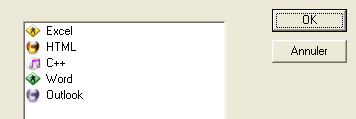
How To In your dialog class header, just add two attributes: CImageList m_imageList; //image list used by the tree CBitmap m_bitmap; //bitmap witch loads 32bits bitmap
At the end of InitDialog
1
2
3
4
5
6
7
8
9
10
// Create a 32bits ImageList
m_imageList.Create (16, 16, ILC_COLOR32 , 1,1);

//Add the bitmap to the ImageList
m_bitmap.LoadBitmap(IDB_BITMAP_HIGHCOLOR);
m_imageList.Add(&m_bitmap, RGB(255,0,255));

//Manage your tree items......
m_tree.SetImageList (&m_imageList, TVSIL_NORMAL);
m_tree.InsertItem("RootItem",0,0,TVI_ROOT);
It is a very easy way for making a good rendering with VC++ 6.0.
That’s all !!!!